
Seedance 2.0 Fast AI Video Generator
Keep reference-heavy projects moving from brief to review. Seedance 2.0 Fast preserves mixed image, video, and audio direction while shortening the configured wait to about two minutes, so you can judge choreography, composition, and sound sooner. Create 4 to 15-second clips with generated audio on Picir AI.
Why Generate with Seedance 2.0 Fast
Move from References to Review Sooner
A two-minute configured estimate shortens the wait between assembling source material and judging the generated shot.
Describe What Each Asset Contributes
Use images for appearance, clips for motion, audio for sound, and text to tell the model how those sources should work together.
Control Timing to the Second
Set any whole-second length from 4 through 15 so the result fits the action instead of an arbitrary fixed duration.
Core Seedance 2.0 Fast Features
- •Mixed-Media Guidance: Reference up to nine images, three videos, and three audio files in a single generation request.
- •Frame-to-Frame Planning: Lock the opening composition and optionally specify the final frame for a more deliberate transition.
- •Fine Duration Control: Select each whole-second duration from 4 through 15 for short beats or longer shot development.
- •Joint Sound Output: The generator requests audio together with the visual sequence in every supported mode.
- •Two Resolution Levels: Render at 480p for a lighter job or choose 720p when more visible detail is needed.
- •Wide Format Range: Use six fixed ratios plus adaptive framing to suit social, square, standard, or cinematic layouts.
Turn a Reference Photograph into a Specific Action
A starting image can carry appearance and composition while the prompt concentrates on choreography. This helps when the scene calls for recognizable clothing, props, or surroundings but the desired motion is new. Fast uses the same Seedance 2.0 family input concept with a shorter configured wait. The original image, published prompt, and matched family output are kept together below.
| Reference Image | Prompt | Seedance Family Video |
|---|---|---|
 | The girl is gracefully drying the clothes. After that, she takes out another one from the bucket and shakes it vigorously. |
Define the Transition with Two Visual Anchors
Supplying the first and last frames narrows the model's task to the movement between two planned states. It is a useful option for reveals, product changes, and compositions that must land on a particular ending. No source prompt was available for this family media, so the table does not invent one. The genuine inputs and generated result are displayed as a complete set.
| Opening Frame | Closing Frame | Seedance Family Video |
|---|---|---|
 |  |
Translate Storyboard Notes into a Timed Sequence
A storyboard reference can communicate shot scale, dialogue, composition, and movement more efficiently than prose alone. The accompanying prompt identifies how the model should interpret that document. Seedance Fast can accept this reference-image workflow and produce up to a 15-second result. The exact family prompt remains paired with the published storyboard and output.
| Storyboard Reference | Prompt | Seedance Family Video |
|---|---|---|
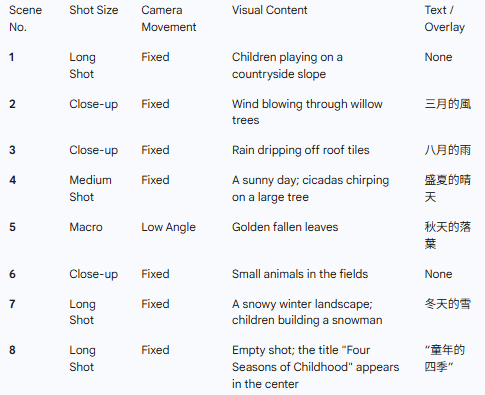 | Based on the shooting script of the feature film shown in @Image 1, and referring to the shots, camera angles, movement shots, scenes and dialogues in @Image 1, create a 15-second soothing opening sequence about 'The Four Seasons of Childhood'. |
How to Use Seedance 2.0 Fast
Tell the model what to borrow from each source, then tune the format and timing of the result.
Choose Text, Frames, or References
Begin with a prompt, add a single image, supply first and last frames, or combine image, video, and audio reference files.
Configure the Output
Set a 4 to 15-second duration, choose 480p or 720p, and select a fixed aspect ratio or adaptive framing.
Generate, Review, and Refine
Run the request, inspect how the model used each reference, and download the clip or tighten your instructions.
Choose the plan that's right for you
Get all features of Picir.ai, complete tasks quickly and achieve professional results with our advanced AI technology.
Basic
- 600 credits/month
- All features available
- Unlimited downloads per day
- Assets owned by customer
- Faster generation speed
- Priority support
Pro
- 1600 credits/month
- All features available
- Unlimited downloads per day
- Assets owned by customer
- Faster generation speed
- Priority support
Max
- 4000 credits/month
- All features available
- Unlimited downloads per day
- Assets owned by customer
- Faster generation speed
- Priority support
Prime
- 8000 credits/month
- Team management
- Up to 5 team members
- All features available
- Unlimited downloads per day
- Assets owned by customer
- Faster generation speed
- Priority support
Seedance 2.0 Fast Specifications
Verified Seedance 2.0 Fast settings exposed on Picir AI.
| Developer | ByteDance Seed |
| Model type | Multimodal AI video generation with audio |
| Generation modes | Text or image to video; first & last frame to video; reference to video |
| Aspect ratios | 16:9, 4:3, 1:1, 3:4, 9:16, 21:9, adaptive |
| Output resolution | 480p, 720p |
| Clip duration | 4-15 seconds |
| Reference inputs | Up to 9 images, 3 videos, and 3 audio files |
| Typical generation time | About 2 minutes |
| Access | VIP membership required |
Last updated: July 24, 2026
Questions About Seedance 2.0 Fast
Review timing, reference limits, output settings, credit rates, and access requirements.
What is Seedance 2.0 Fast?
Seedance 2.0 Fast is a speed-focused ByteDance Seed family option available on Picir AI. It creates 480p or 720p video with generated audio from text, images, frames, and mixed-media references.
How quickly does Seedance 2.0 Fast generate?
The current generator estimate is about two minutes. That is roughly one minute shorter than the configured estimate for Mini, although actual queue time can vary.
What can I use as reference material?
Upload as many as nine images, three videos, and three audio files in reference mode. Audio references must be used with at least one image or video.
Which durations are available?
You can select any whole-second duration from 4 to 15, including intermediate values such as 7, 11, or 14 seconds.
What resolution and aspect ratio options are offered?
Choose 480p or 720p. Available framing includes 16:9, 4:3, 1:1, 3:4, 9:16, 21:9, and adaptive.
How are Seedance 2.0 Fast credits calculated?
Fast costs 20 credits per second at 480p and 40 credits per second at 720p. The minimum four-second request therefore costs 80 credits.
Is Seedance 2.0 Fast restricted to VIP members?
Yes. The model's workspace configuration requires VIP access before a generation can be submitted.
Does Fast generate sound in every mode?
Yes. Audio generation is enabled in the shared request settings for text, image, frame-guided, and reference-guided video.
Should I choose Fast or Mini?
Choose Fast when a shorter expected wait is worth the higher per-second credit rate. Choose Mini when reducing credit use matters more than turnaround.