
FLUX 3 Image Klein
Turn ideas into detailed images and refine the parts you want to change. FLUX 3 Image Klein from Black Forest Labs combines image creation, instruction-based editing, and visual references in a compact model. Start creating with FLUX 3 Image Klein on Picir AI today.
Bring Your Ideas to Life With FLUX 3 Image Klein
Explore Different Looks From One Idea
Move between photography, illustration, and graphic design with a written description. Keep your subject in focus while trying another visual direction.
Improve a Picture Without Rebuilding It
Use an existing image as your starting point and describe the change. Refine a detail or transform the setting while guiding the model with the original picture.
Bring Your References Into the Result
Use familiar people, objects, or styles to shape a new composition. Multiple references give the model visual context that can be difficult to capture in words alone.
What FLUX 3 Image Klein Can Do
- •Text to Image: Describe a scene, mood, and visual style to create an image, from a close-up portrait to an illustrated landscape.
- •Instruction-Based Editing: Tell the model what to change in an uploaded picture, such as adding an accessory or changing the season.
- •Multiple Reference Images: The model supports up to 10 visual references, helping you combine subjects and guide the appearance of a new image.
- •Native 4K Output: Generate at up to 4K resolution for images that need room for fine texture, lettering, and close inspection.
- •Typography and Design: Combine short text with illustrations and visual structure for posters, covers, and informative graphics.
- •Compact Open Weights: The 5.6B image generator comes in distilled and base versions, offering options for fast inference and custom training.
Create Portraits With Believable Detail
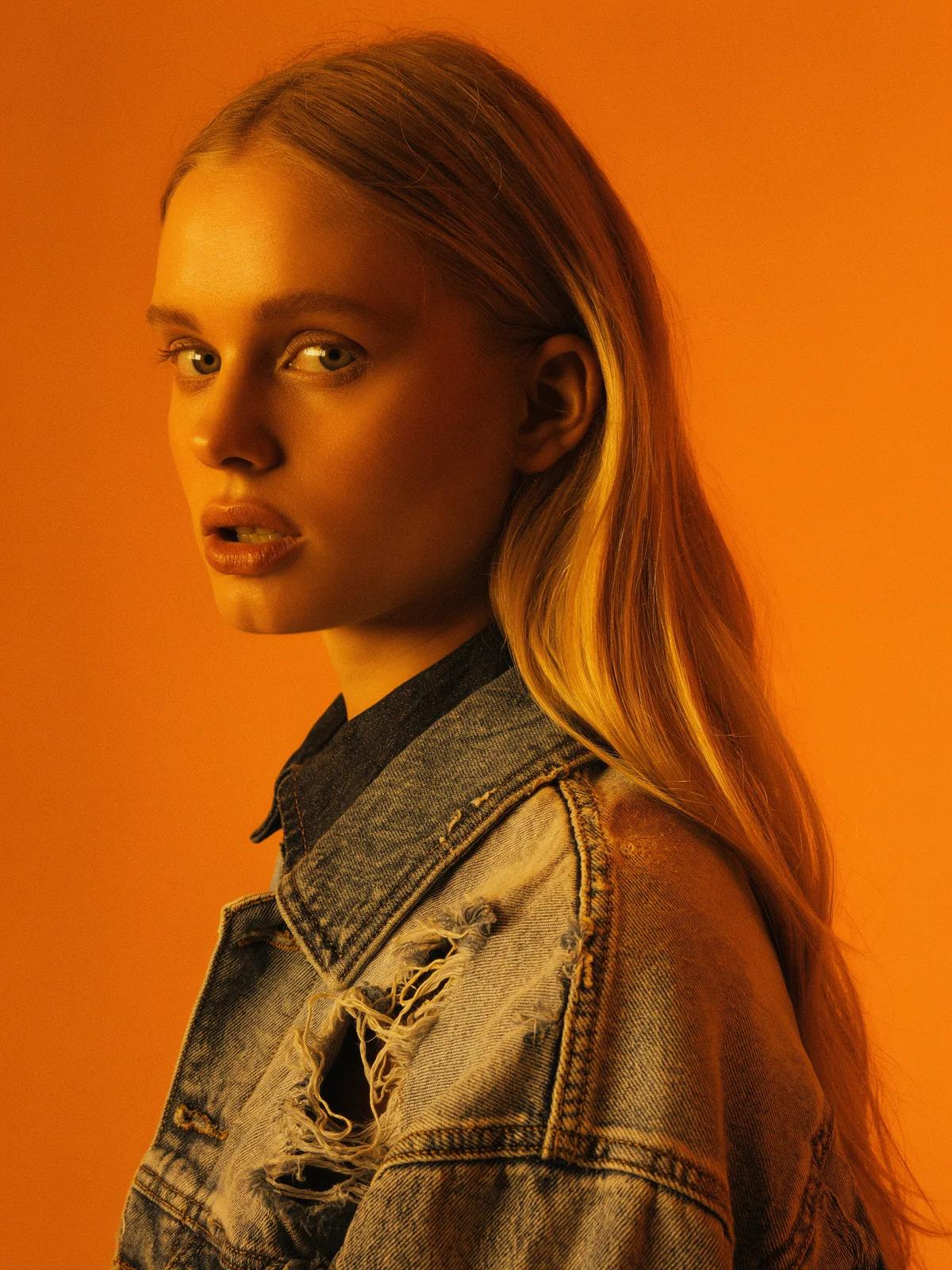
FLUX 3 Image Klein can render the textures that make a portrait feel convincing: skin, hair, fabric, and reflected light. Describe the framing, background, and lighting to establish the look. This official example shows a denim jacket and a warm orange backdrop. Use specific visual details in your own prompt to make the result easier to assess.
Give Illustrations a Distinct Visual Style
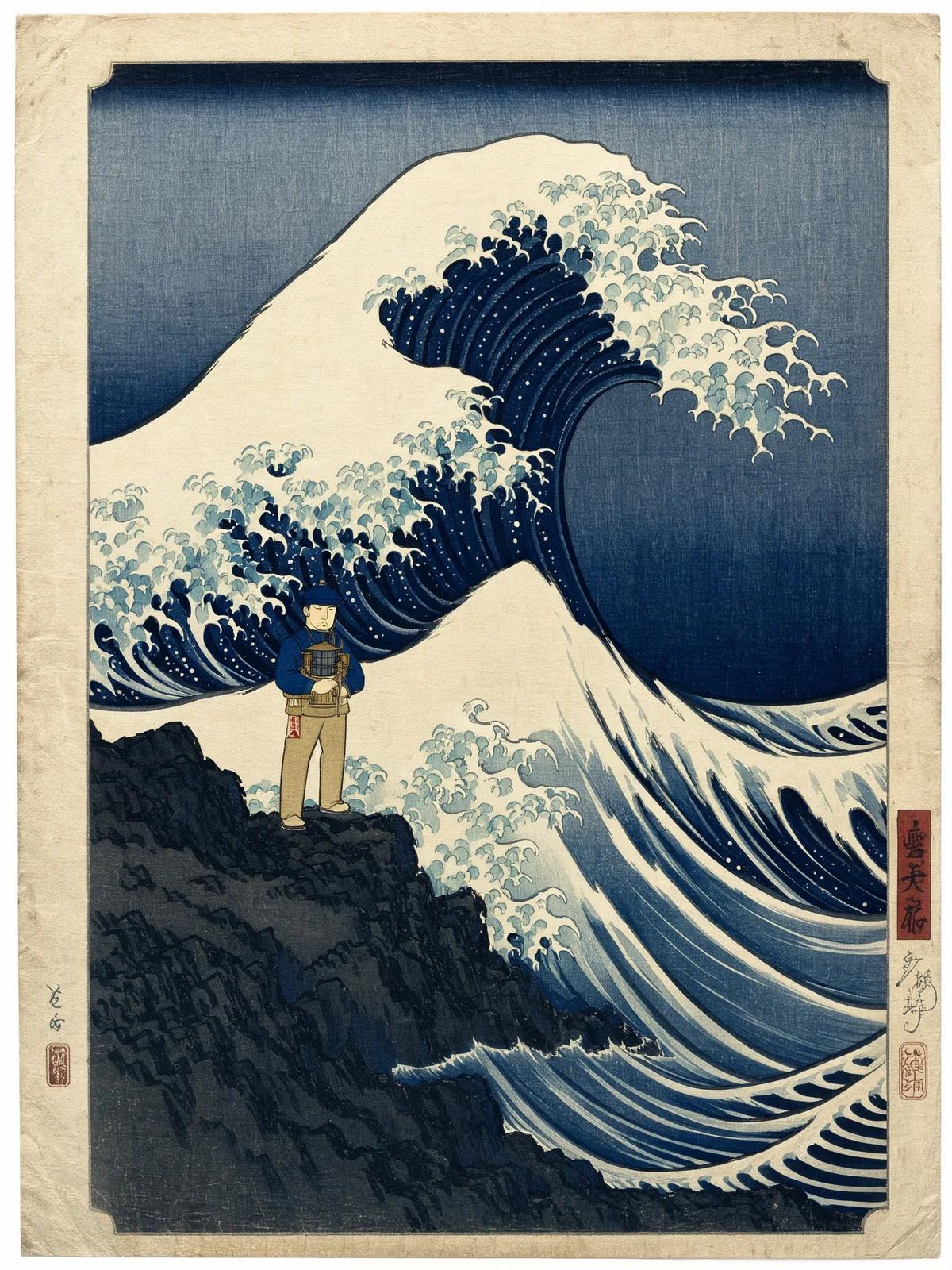
A change of medium can give the same idea a very different character. FLUX 3 Image Klein supports styles ranging from woodblock prints to mosaic, clay, and pixel art. This official lighthouse scene illustrates how line work, limited colors, and wave patterns can define a composition. Name the medium and the mood you want when describing your own scene.
Bring Words and Pictures Into One Design
Create layouts that combine readable headings with illustrations and supporting details. FLUX 3 Image Klein can explore covers, posters, and step-by-step graphics, such as this official ramen recipe example. Specify the exact words and their role in the composition. Review spelling and factual details before sharing the finished image.

Make a Small Edit or Change the Whole Setting
Describe the change you want while using the original picture as a reference. The official examples below show both a small accessory edit and a broader seasonal transformation. Each row preserves the original input, the published instruction, and its matching result. Compare the unchanged subjects as well as the new details to judge whether an edit meets your goal.
| Original Image | Edit Instruction | Edited Image |
|---|---|---|
 | Tie a small red bandana around the dog's neck. |  |
 | Turn this summer street into winter after light snowfall. |  |
How to Create With FLUX 3 Image Klein
Start with a clear idea, add useful visual context, and refine the result.
Describe Your Image or Edit
Write the subject, composition, lighting, and style you want. For an edit, explain what should change and which details should remain.
Add References and Choose Settings
Upload images when you want to guide the subject or edit an existing picture. Choose the available image settings in the generator and check the credit cost before submitting.
Generate, Review, and Download
Inspect the image for composition, text, and important details. Adjust your description if needed, then download the result you want to keep.
Choose the plan that's right for you
Get all features of Picir.ai, complete tasks quickly and achieve professional results with our advanced AI technology.
Basic
- 600 credits/month
- All features available
- Unlimited downloads per day
- Assets owned by customer
- Faster generation speed
- Priority support
Pro
- 1600 credits/month
- All features available
- Unlimited downloads per day
- Assets owned by customer
- Faster generation speed
- Priority support
Max
- 4000 credits/month
- All features available
- Unlimited downloads per day
- Assets owned by customer
- Faster generation speed
- Priority support
Prime
- 8000 credits/month
- Team management
- Up to 5 team members
- All features available
- Unlimited downloads per day
- Assets owned by customer
- Faster generation speed
- Priority support
FLUX 3 Image Klein Specifications
Core model specifications published by Black Forest Labs.
| Developer | Black Forest Labs |
| Model type | Open-weights image generation and editing model |
| Image generator parameters | 5.6 billion; excludes text encoders |
| Core tasks | Text to image, image editing, multi-reference generation |
| Maximum output resolution | Native 4K |
| Reference image capacity | Up to 10 images |
| Weight variants | Distilled for inference; base for fine-tuning and research |
| Weights license | FLUX Kommunity License |
Last updated: October 16, 2026
FLUX 3 Image Klein Questions, Answered
Learn about image creation, editing, references, and the open-weights release.
What is FLUX 3 Image Klein?
FLUX 3 Image Klein is an image model developed by Black Forest Labs. It creates pictures from text, edits existing images, and uses multiple visual references. Its image generator has 5.6 billion parameters, and BFL publishes both distilled and base weights.
How does Klein relate to FLUX 3 Image?
Klein brings the FLUX 3 Image approach to a smaller model with downloadable weights. BFL describes shared capabilities including 4K generation, reference-guided creation, image editing, and bounding-box control. The compact generator also supports local deployment and adaptation.
Can FLUX 3 Image Klein generate 4K images?
Yes. BFL documents native output up to 4K for both Klein variants. Choose the output settings available in the generator for your image; resolution affects the amount of detail and the generation cost.
How many reference images can it use?
The model supports up to 10 reference images. Explain which subject, object, or visual style each reference should contribute. A few relevant images and clear instructions can be more useful than many unrelated references.
Can it edit one part of a picture?
Yes. Describe a focused change, such as adding an accessory, while using the original image as context. BFL also documents bounding boxes for defining editing regions and API pixel restoration for keeping untouched areas intact.
What makes a useful prompt?
Describe the subject, framing, background, light, and visual style. For edits, state the desired change directly and identify anything that should stay the same. Keep any text you want in the image short and check the generated lettering.
What is the difference between base and distilled weights?
The distilled version is designed for shorter inference runs, while the base version is intended for fine-tuning, LoRA training, and research. BFL documents 16 inference steps for distilled and 50 for base. Choose base weights when you want to adapt the model to your own visual style.
Can I run FLUX 3 Image Klein on my own hardware?
BFL provides weights for local workflows including ComfyUI and Diffusers. Its release reports an INT8 configuration running on an NVIDIA RTX GPU with 8 GB VRAM. Memory needs depend on the complete workflow, including text encoding and prompt enhancement, so check the official setup instructions for your hardware.
How is FLUX 3 Image Klein priced on Picir AI?
Check the generator for the credit cost of your selected settings before creating an image. The pricing section explains the available Picir AI plans. BFL API pricing and the license for downloaded weights are separate from your Picir AI usage.
Where can I use FLUX 3 Image Klein?
You can use FLUX 3 Image Klein on Picir AI.